
Choosing the right laptop can be difficult because hundreds of models are available across different price ranges. Some laptops are designed for students and office work, while others are made for gaming, programming, graphic design, video editing, or business use.
Laptop specifications can also look confusing. Buyers often see terms such as processors, RAM, SSD storage, graphics cards, refresh rates, and battery capacity without fully understanding how these features affect everyday performance.
Detailed laptop reviews and comparisons make the buying process easier. They help users understand the strengths, weaknesses, performance, build quality, and overall value of different devices before spending money.
Why Laptop Reviews and Comparisons Are Important
Laptop manufacturers usually promote their products using impressive specifications and attractive marketing claims. However, technical specifications do not always explain how a laptop performs during real-world use.
A laptop may have a powerful processor but suffer from poor cooling. Another model may offer a premium design but provide limited ports or average battery life.
Professional laptop comparisons examine factors such as:
- Processor performance
- RAM and storage capacity
- Display quality
- Battery timing
- Keyboard and trackpad comfort
- Build quality
- Cooling performance
- Port selection
- Webcam and microphone quality
- Price and long-term value
Reading detailed reviews allows buyers to choose a laptop that suits their actual needs instead of purchasing a device based only on appearance or brand name.
Understanding Laptop Processors
The processor is one of the most important components of a laptop. It controls how quickly the computer performs tasks, opens applications, processes data, and handles multitasking.
Modern laptops commonly use processors from Intel, AMD, Apple, and Qualcomm.
Intel Processors
Intel processors are widely available in budget, business, and performance laptops. Entry-level chips are suitable for browsing, documents, and online learning, while higher-performance models are designed for gaming, editing, and professional software.
AMD Processors
AMD processors often provide strong multitasking and graphics performance. They are commonly found in gaming laptops, affordable notebooks, and productivity-focused devices.
Apple Silicon
Apple MacBooks use Apple-designed processors that combine strong performance with excellent power efficiency. These laptops are popular among students, professionals, programmers, and creative users.
Qualcomm Processors
Some modern Windows laptops use Qualcomm processors designed for better battery life, portability, and artificial intelligence features. Buyers should still check application compatibility before choosing an ARM-based Windows device.
A more powerful processor is not always necessary. Students and office users can save money by choosing a mid-range processor, while gamers and video editors may benefit from higher-performance options.
RAM and Multitasking Performance
RAM allows a laptop to run multiple applications at the same time. A device with insufficient RAM may become slow when several browser tabs, documents, and programs are open.
For basic browsing and document editing, 8GB of RAM may be enough. However, 16GB is generally more suitable for modern multitasking and long-term use.
Users involved in video editing, software development, 3D design, or professional workloads may require 32GB or more.
Buyers should also check whether the laptop’s RAM can be upgraded. Some thin laptops have memory permanently attached to the motherboard, making future upgrades impossible.
SSD Storage Comparison
Most modern laptops use solid-state drives, commonly known as SSDs. SSD storage is much faster than older hard disk drives and improves startup speed, application loading, and file transfers.
Common storage options include:
- 256GB for basic users
- 512GB for most students and professionals
- 1TB for creators, gamers, and heavy users
- 2TB or more for large projects and media libraries
A 256GB laptop may become full quickly when users install large applications, games, or video files.
Cloud storage and external drives can provide additional space, but selecting enough internal storage from the beginning is usually more convenient.
Laptop Display Comparison
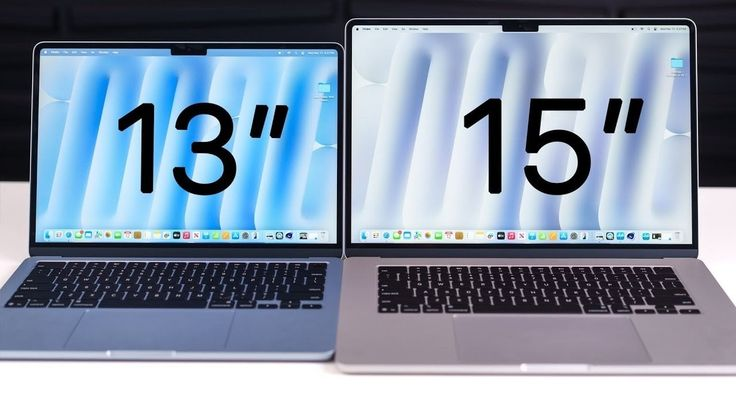
The display strongly affects the overall laptop experience. Users spend hours reading, working, watching videos, and creating content on the screen.
Important display factors include:
Screen Size
Smaller 13-inch and 14-inch laptops are easier to carry. Larger 15-inch and 16-inch models provide more workspace but may be heavier.
Resolution
A Full HD display is suitable for most users. Higher resolutions provide sharper images but can increase the price and reduce battery life.
Panel Quality
IPS displays usually offer good viewing angles and colour quality. OLED screens provide deep blacks, high contrast, and vibrant colours, making them attractive for media consumption and creative work.
Brightness
A brighter screen is easier to use near windows or outdoors. Low-brightness displays may become difficult to view in strong lighting.
Refresh Rate
Standard laptops often use 60Hz displays. Gaming laptops may offer 120Hz, 144Hz, or higher refresh rates for smoother motion.
Battery Life and Charging
Battery life is especially important for students, travellers, remote workers, and business professionals.
Manufacturers may advertise long battery timing, but real-world results depend on:
- Screen brightness
- Processor efficiency
- Background applications
- Wi-Fi and Bluetooth usage
- Video playback
- Gaming
- Battery size
- Power settings
Thin productivity laptops and MacBooks often provide better battery life than gaming laptops. High-performance gaming devices consume more power because of powerful processors, graphics cards, and high-refresh-rate displays.
Fast charging is also useful because it allows users to regain several hours of battery power within a short charging period.
Windows Laptops vs MacBooks
Windows laptops offer greater variety in price, design, hardware, and manufacturer choice. They are available for budget users, gamers, students, businesses, and professionals.
Windows devices also support a wide range of software and hardware accessories.
MacBooks are known for strong build quality, smooth performance, good battery life, and close integration with other Apple devices. They are popular among writers, designers, programmers, and video editors.
The better choice depends on:
- Preferred operating system
- Required applications
- Budget
- Gaming needs
- Device ecosystem
- Upgrade requirements
Gamers generally prefer Windows because it supports more games and dedicated graphics options. Users already using an iPhone or iPad may appreciate the integration offered by a MacBook.
Gaming Laptop Comparisons
Gaming laptops require more powerful hardware than standard office laptops.
A good gaming laptop should include:
- A dedicated graphics card
- A high-performance processor
- At least 16GB of RAM
- Fast SSD storage
- An effective cooling system
- A high-refresh-rate display
- A comfortable keyboard
Graphics performance is one of the most important factors. Buyers should compare the exact graphics card model and its power limits instead of relying only on the product name.
Cooling is equally important. A powerful gaming laptop may lose performance if its cooling system cannot control heat.
Gaming laptops are usually heavier, louder, and less power-efficient than normal laptops. They are best suited to users who prioritize performance over portability.
Laptops for Students
Students usually need a lightweight, dependable, and affordable laptop.
A suitable student laptop should offer:
- Good battery life
- Comfortable keyboard
- Reliable Wi-Fi
- Webcam and microphone
- Portable design
- Enough storage
- Smooth browser performance
Students who mainly use online classes, documents, and presentations may not require expensive hardware.
However, engineering, architecture, programming, or media students may need more powerful processors, additional RAM, and dedicated graphics.
Durability is also important because student laptops are frequently carried between home, school, and libraries.
Business Laptop Reviews
Business laptops focus on reliability, security, comfort, and long-term support.
They commonly include:
- Strong build quality
- Fingerprint or facial recognition
- Good keyboards
- Privacy features
- Multiple ports
- Professional support options
- Long battery life
Business users should also consider webcam quality and microphone performance because video meetings are now a regular part of professional work.
A premium business laptop may cost more, but its durability and support can provide better long-term value.
Laptops for Content Creation
Video editors, graphic designers, photographers, and animators require laptops with strong performance and accurate displays.
Important features include:
- Powerful multicore processor
- Dedicated graphics card
- At least 16GB or 32GB of RAM
- Fast SSD storage
- Colour-accurate display
- Effective cooling
- Memory card reader
- High-speed ports
A high-resolution display is useful, but colour accuracy is often more important for professional creative work.
Content creators should also check whether the laptop supports external monitors and high-speed storage devices.
Build Quality and Portability
Laptop materials affect durability, weight, and appearance. Metal laptops generally feel more premium, while plastic devices can be lighter and more affordable.
Buyers should inspect:
- Hinge strength
- Keyboard flex
- Lid durability
- Weight
- Thickness
- Charger size
A lightweight laptop is easier to carry, but extremely thin devices may have fewer ports and limited cooling.
The ideal balance depends on whether the laptop will remain on a desk or be carried regularly.
Keyboard, Trackpad, and Ports
A laptop may have excellent specifications but still provide a poor experience if the keyboard or trackpad is uncomfortable.
Writers, students, and office users should choose a keyboard with good spacing and comfortable key travel.
A precise trackpad improves navigation and reduces the need for an external mouse.
Important ports may include:
- USB-A
- USB-C
- HDMI
- Headphone jack
- Memory card reader
- Charging port
- Ethernet
Some thin laptops provide only USB-C ports, requiring users to purchase adapters.
Common Laptop Buying Mistakes
Buyers often make mistakes by focusing on one specification while ignoring the complete package.
Common mistakes include:
- Choosing insufficient RAM
- Buying too little storage
- Ignoring display quality
- Selecting a heavy laptop for travel
- Paying for unnecessary gaming power
- Ignoring software compatibility
- Forgetting battery performance
- Not checking upgrade options
- Overlooking warranty support
- Buying only because of brand popularity
Comparing multiple laptops before making a decision can prevent these problems.
Conclusion
Laptop reviews and comparisons help buyers evaluate performance, battery life, display quality, storage, design, portability, and long-term value. The best laptop is not always the most expensive model; it is the device that matches the user’s actual requirements.
Students should focus on battery life, portability, and reliability, while gamers need powerful graphics and effective cooling. Business users may prioritize security and build quality, whereas content creators require strong performance and colour-accurate displays.
Before purchasing, buyers should compare processors, RAM, storage, operating systems, ports, and software support. Careful research can help users choose a reliable laptop that provides smooth performance and useful features for several years.