

Apple regularly releases iOS updates to improve the performance, security, design, and functionality of the iPhone. These updates may include small bug fixes, important security patches, or major features that change how users interact with their devices.
Many iPhone users install updates without checking what has changed. However, understanding the latest iOS update features can help users take advantage of new tools, adjust privacy settings, and improve their overall iPhone experience.
Modern iOS updates focus heavily on artificial intelligence, communication, customization, accessibility, privacy, and device performance. Some features may only be available on selected iPhone models because they require newer hardware.
What Is an iOS Update?
An iOS update is a new version of Apple’s mobile operating system for the iPhone. Apple develops these updates to fix technical issues, add new features, improve security, and ensure compatibility with modern applications.
iOS updates generally fall into two main categories.
Major updates introduce large changes such as redesigned applications, new system tools, and updated privacy settings. Smaller updates usually contain security fixes, bug corrections, and performance improvements.
Common iOS update features include:
- Improved security protection
- New messaging tools
- Better privacy controls
- Camera and photo improvements
- Artificial intelligence features
- Interface customization options
- Battery and performance improvements
- Accessibility upgrades
- Application compatibility fixes
Installing official iOS updates helps users keep their iPhones secure and reliable.
Improved Security and Privacy
Security is one of the most important parts of every iOS update. Apple regularly identifies potential weaknesses and releases fixes to protect users from harmful software, suspicious links, and unauthorized access.
Modern iOS updates may include stronger protection for passwords, online accounts, applications, and stored information.
Apple also gives users more control over application permissions. Users can review which apps have access to their camera, microphone, contacts, photos, location, and other sensitive information.
Some privacy improvements may include:
- Better tracking controls
- Stronger account security
- Improved password management
- Permission alerts
- Protection against suspicious websites
- More secure application access
- Enhanced data encryption
Users should review their privacy settings after installing a major iOS update because new controls may become available.
Smarter iPhone Features
Artificial intelligence and machine learning are becoming important parts of iOS updates. These technologies help the iPhone understand user habits, improve search results, organize information, and automate everyday tasks.
Smart iOS features may assist with:
- Writing and editing text
- Summarizing notifications
- Organizing photos
- Improving voice commands
- Searching files and messages
- Translating text
- Removing unwanted objects from images
- Providing useful suggestions
Some advanced intelligence features may only work on newer iPhone models with compatible processors.
Users should also check how AI-related features handle personal data. Apple generally provides privacy settings that allow users to manage these tools.
Messaging and Communication Features
The Messages application is often improved through major iOS updates. Apple continues adding tools that make conversations more expressive, organized, and convenient.
New messaging features may include improved text effects, message scheduling, better group conversation controls, and stronger spam protection.
Users may also receive improvements to:
- Audio messages
- Stickers and emojis
- Group chats
- Message reactions
- Search tools
- Contact sharing
- Unknown sender filtering
- Cross-platform messaging
Communication updates can make the Messages app more useful for personal, school, and business conversations.
FaceTime may also receive improvements such as better video quality, live captions, screen sharing, and clearer audio.
Home Screen Customization
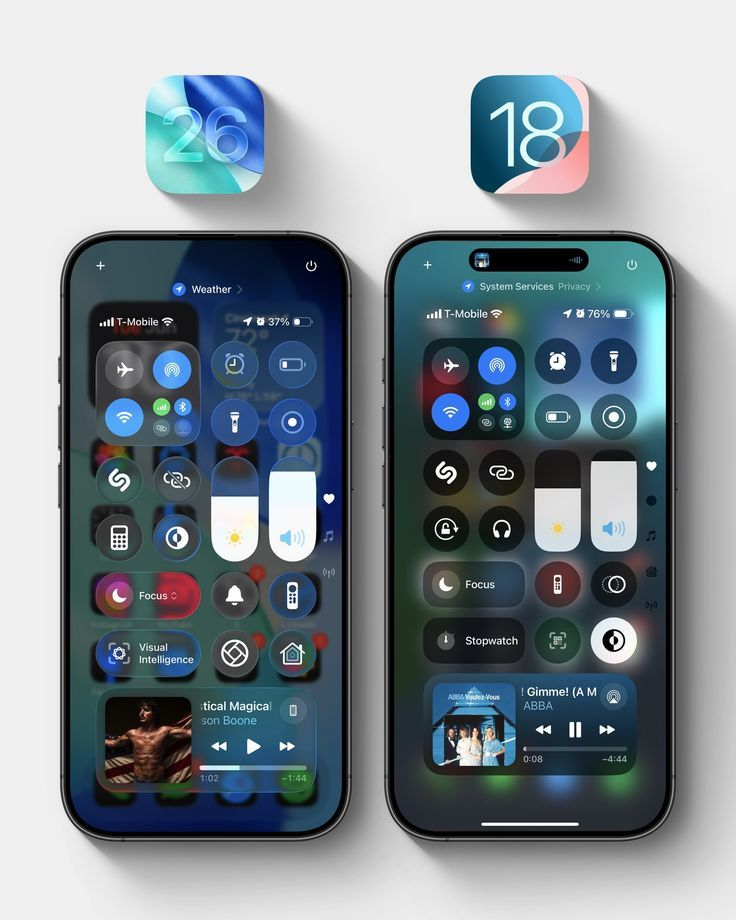
Apple has gradually expanded iPhone customization options. Modern iOS updates allow users to personalize the appearance and organization of their home screen.
Users may be able to change:
- Application icon appearance
- Widget positions
- Lock screen layouts
- Wallpaper styles
- Text size
- Control Center settings
- Notification display options
Widgets provide useful information without requiring users to open an application. Weather, calendar, battery, reminders, and fitness widgets can be placed on the home screen for easier access.
Customization features help users create an iPhone layout that suits their personal style and daily needs.
Control Center Improvements
The Control Center gives quick access to important settings such as Wi-Fi, Bluetooth, brightness, volume, airplane mode, and screen recording.
Recent iOS updates have made the Control Center more flexible and customizable. Users may be able to add, remove, resize, or rearrange controls.
This allows users to access their most frequently used tools more quickly.
Useful Control Center options can include:
- Flashlight
- Calculator
- Camera
- Screen recording
- Battery-saving mode
- Mobile data
- Focus mode
- Music controls
- Accessibility shortcuts
A better-organized Control Center can make everyday iPhone use faster and more convenient.
Camera and Photo Improvements
Camera and Photos applications are important parts of the iPhone experience. iOS updates often improve photo organization, editing tools, and image quality.
Camera improvements may include better low-light photography, improved portrait effects, faster image processing, and more stable video recording.
The Photos application may receive features such as:
- Improved search
- Automatic collections
- Duplicate photo detection
- Better editing controls
- Object removal tools
- Memory creation
- Shared photo management
- Privacy protection
Users can search for photos using locations, people, objects, or events. Intelligent organization makes it easier to find older images without manually browsing every folder.
Safari and Browsing Features
Safari is Apple’s built-in web browser, and it regularly receives privacy and performance improvements through iOS updates.
New Safari features may include better tracking prevention, improved tab management, stronger password security, and faster page loading.
Safari can also provide tools such as:
- Private browsing protection
- Reader mode
- Website translation
- Saved tab groups
- Password alerts
- Content blocking
- Improved download management
Users should always keep Safari updated because browser security is important for online banking, shopping, email, and account access.
Battery and Performance Improvements
Many users expect an iOS update to improve battery life and device speed. Apple regularly optimizes system processes to reduce unnecessary power usage and improve efficiency.
After installing an update, the iPhone may temporarily use more battery while it completes background tasks. These tasks can include photo indexing, app optimization, file organization, and system scanning.
Battery performance usually becomes more stable after the device finishes these processes.
Users can check battery activity by opening:
Settings → Battery
This section shows which apps are using the most power.
Performance improvements may also reduce app crashes, improve touchscreen response, and make animations smoother.
Accessibility Features
Apple includes accessibility improvements in many iOS updates. These tools help users with visual, hearing, mobility, speech, or learning needs use the iPhone more comfortably.
Accessibility features may include:
- Voice Control
- Live captions
- Screen reading
- Sound recognition
- AssistiveTouch
- Magnification tools
- Adjustable text sizes
- Hearing device support
- Voice shortcuts
These features can be useful for a wide range of users, not only people with permanent disabilities.
For example, live captions can help users understand audio in noisy environments, while larger text can improve readability.
Focus Mode and Notifications
Focus Mode helps users control when and how notifications appear. Different Focus profiles can be created for work, study, sleep, driving, or personal time.
An iOS update may improve Focus Mode by adding smarter filters, customized home screens, and better application controls.
Users can decide which contacts and apps are allowed to send notifications during a selected Focus profile.
Notification improvements may include:
- Better grouping
- Priority alerts
- Scheduled summaries
- Reduced interruptions
- Lock screen organization
- Smart notification filtering
These tools can help users reduce distractions and improve productivity.
App Store and Application Updates
iOS updates also improve the way applications work on the iPhone. Developers update their apps to support new iOS features, security standards, and design requirements.
After installing a major iOS update, users should check the App Store for pending app updates.
To update applications:
- Open the App Store.
- Tap the profile icon.
- Scroll to available updates.
- Select Update All or update apps individually.
Updated applications are more likely to work properly with the latest iOS version.
How to Check for an iOS Update
Users can manually check for an update through the iPhone settings.
Follow these steps:
- Open Settings.
- Select General.
- Tap Software Update.
- Wait while the iPhone checks for available updates.
- Select Download and Install.
Before installing an update, connect the iPhone to Wi-Fi, ensure there is enough storage, and charge the battery.
Creating an iCloud or computer backup is recommended before installing a major iOS version.
Should You Install iOS Updates Immediately?
Security updates should generally be installed promptly because they protect the device against known risks.
For major iOS upgrades, users may prefer to wait briefly if they depend on important business apps or accessories. This gives developers time to improve compatibility.
However, delaying updates for a long time can leave the device without important protection and application support.
Always install updates through the official Software Update section. Avoid downloading files from unknown websites or suspicious links.
Conclusion
iOS update features are designed to make the iPhone more secure, intelligent, customizable, and user-friendly. New updates may improve privacy controls, messaging, camera tools, browsing, accessibility, battery management, and overall system performance.
Users should regularly check for official updates, back up important data, use a stable Wi-Fi connection, and ensure that enough battery and storage are available before installation.
By keeping iOS updated, users can protect their personal information, access new features, and enjoy a smoother and more reliable iPhone experience.